

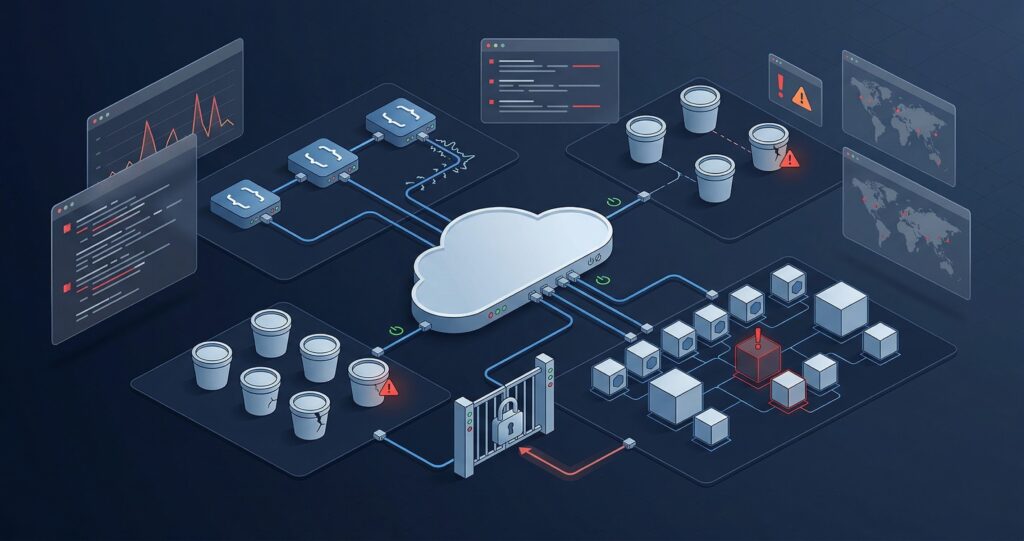
Cloud security threats in 2026 are driven by identity abuse, misconfigurations, API failures, and supply chain attacks. Most breaches do not exploit zero-days. Instead, they exploit gaps in IAM, exposed storage buckets, stolen credentials, and inconsistent policies across multi-cloud environments.
Is Your Cloud Environment Ready for 2026’s Threat Landscape?
Your cloud environment is almost certainly more exposed than you think.
Not because your team is careless. Rather, the cloud security threats in 2026 have outpaced most organisation’s ability to keep up. Faster releases, multi-cloud sprawl, AI-assisted attackers, and layers of SaaS tools have built a threat landscape unlike anything from two or three years ago.
Industry data consistently shows that most cloud breaches come from misconfiguration, identity abuse, or poor monitoring. In other words, attackers are not always smarter your environment is just more complex. And complexity creates gaps.
So, this guide breaks down the 12 most critical cloud security risks in 2026. It explains how attackers exploit each one and gives you a clear path to fix them. Whether you run AWS, Azure, GCP, or all three, this is the briefing your team needs right now.
Why Cloud Security Threats in 2026 Keep Growing
Cloud providers are not the problem. AWS, Azure, and GCP have all hardened their infrastructure significantly. However, the real issue is the shared responsibility model and most teams have not fully understood what they are actually responsible for.
Under this model, the cloud provider secures the physical layer: hardware, hypervisors, and the global network. You, on the other hand, are responsible for everything above it identity, data controls, network rules, app security, and monitoring.
So when something goes wrong in 2026, it almost always traces back to one of three root causes:
- Identity and access management (IAM) gaps over-permissioned roles, leaked credentials, no MFA
- Misconfiguration open storage buckets, loose security groups, exposed admin panels
- Exposure management failures no continuous monitoring, stale assets, shadow infrastructure
Multi-cloud complexity makes all of this worse. For example, when your team juggles AWS for compute, Azure for identity, and GCP for data pipelines, security policies rarely stay consistent. As a result, every gap becomes a potential entry point for attackers.
The 12 Biggest Cloud Security Threats in 2026 (With Examples + Fixes)
1. Cloud Misconfiguration: The Most Common Security Risk in 2026
What it is: Cloud storage S3 buckets, Azure Blob containers, GCS buckets gets accidentally set to public. In other cases, access policies let in the wrong users entirely.
How attackers exploit it:
- Automated scanners probe for open buckets across all three major cloud providers, around the clock
- Exposed buckets rarely trigger alerts before the data is already gone
- Misconfigured security groups also expose admin panels, databases, and internal APIs to the public internet
Example: A fintech startup migrates its reporting pipeline to AWS. A developer sets an S3 bucket to public for quick testing, then forgets to revert it. Within 72 hours, automated tools have indexed the bucket and pulled six months of customer transaction logs.
Impact: Regulatory fines, customer data exposure, breach notifications, and lasting damage to your brand.
What to do:
- Enable S3 Block Public Access at the account level not just per bucket
- Use AWS Config or Azure Policy to flag public storage resources on a continuous basis
- Audit bucket ACLs and object-level permissions every quarter
- Add Service Control Policies (SCPs) to block public bucket creation in production accounts
- Run automated misconfiguration scans as part of your CI/CD pipeline
- Classify data before storing it not every bucket needs the same controls
2. IAM Over-Permissions: A Critical Cloud Security Threat in 2026
What it is: IAM roles, users, and service accounts get far more permissions than their job needs. Over time, these stack up and create escalation paths that attackers can chain together.
How attackers exploit it:
- First, they find a low-privilege account through phishing, leaked credentials, or token theft
- Next, they list IAM permissions using standard cloud API calls
- Finally, they chain together two seemingly harmless permissions such as
iam:PassRoleandec2:RunInstancesto reach admin level
Example: A contractor gets broad read/write access to an S3 bucket and, separately, the ability to pass roles to EC2 instances. An attacker who steals that contractor’s session token uses both permissions together to launch an EC2 instance with an admin role attached.
Impact: Full account takeover, data theft, resource abuse, and lateral movement across cloud services.
What to do:
- Apply least-privilege strictly: start with zero permissions, then add only what is needed
- Audit unused permissions with AWS IAM Access Analyzer or Azure AD Access Reviews
- Remove all wildcard permissions (
*:*) from production roles - Enforce MFA for every human user especially root and admin accounts
- Prefer short-lived credentials such as IRSA or Workload Identity over long-lived keys
- Review permission boundaries and SCPs every quarter, without exception
3. Stolen Cloud Credentials: Token Theft and OAuth Abuse
What it is: Attackers get hold of valid cloud credentials access keys, session tokens, or OAuth tokens. They then use these to impersonate real users or services, often without detection.
How attackers exploit it:
- Attackers steal long-lived access keys from GitHub repositories or CI/CD logs.
- OAuth flows are often abused to generate persistent tokens for SaaS apps connected to cloud environments.
-
Phishing and adversary-in-the-middle (AiTM) attacks are also used to capture session tokens that can bypass MFA.
Example: A developer pushes code to a public GitHub repo with an AWS key hardcoded in a config file. An automated scanner finds it in minutes. As a result, the attacker spins up GPU instances for cryptomining running up a $40,000 cloud bill before anyone notices.
Impact: Financial loss, data theft, cryptomining abuse, and full environment compromise.
What to do:
- Use AWS Secrets Manager, Azure Key Vault, or GCP Secret Manager never hardcode credentials
- Enable GitHub secret scanning and pre-commit hooks to catch leaks before a push goes through
- Set billing alerts and anomaly detection to flag unexpected spikes early
- Enforce phishing-resistant MFA ideally FIDO2 or hardware keys for all privileged accounts
- Rotate long-lived access keys and switch to short-lived, role-based credentials
- Monitor for credential use from unexpected IP ranges or unusual regions
4. API Security Failures: A Major Cloud Threat in 2026
What it is: Cloud apps expose APIs. However, those APIs often suffer from broken object-level authorization (BOLA/IDOR), missing authentication, or responses that leak far more data than intended.
How attackers exploit it:
- They change object IDs in API requests to pull another user’s records
- They also call internal APIs exposed without authentication through misconfigured API gateways
- As a result, they can extract entire database dumps from APIs that return more fields than the app needs
Example: A SaaS HR platform on GCP returns full employee records salary, tax data, and all via /api/employee/{id}. By simply incrementing the ID number, any logged-in user can read records from other organisations entirely.
Impact: Massive data exposure, DPDP Act and GDPR violations, and potential legal action.
What to do:
- Add object-level authorization checks on every API endpoint not just at the login layer
- Use an API gateway with rate limiting, IP allowlisting, and schema validation
- Follow the OWASP API Security Top 10 when you design and review APIs
- Return only the fields the requesting user is allowed to see
- Log all API calls with user identity, IP, and payload metadata for later forensics
- Always include API testing in your pentest scope
5. Kubernetes and Container Security Threats in 2026
What it is: Kubernetes cloud security threats appear when RBAC is set up wrong, the API server is public, container images are untrusted, or workloads run with too many privileges.
How attackers exploit it:
- An exposed Kubernetes API server without authentication becomes an easy entry point.
- From there, a vulnerable container can be exploited to break out to the host node.
- Loose RBAC roles further allow the creation of privileged pods or theft of service account tokens.
- In addition, they poison container images in a registry with malicious layers
Example: A startup leaves its Kubernetes API server open to the internet with anonymous auth enabled a leftover from a proof-of-concept. An attacker finds it, drops a cryptomining pod, and then pivots to the production cluster via a shared service account token.
Impact: Workload disruption, lateral movement, data theft from volumes, and full cluster takeover.
What to do:
- Never expose the Kubernetes API server to the public internet
- Disable anonymous auth and enforce RBAC with strict least-privilege roles
- Scan container images before deployment Trivy, Grype, and AWS ECR scanning all work well
- Use Pod Security Standards to block privileged container execution
- Enable audit logging on all API server requests
- Restrict pod egress using Network Policy objects
6. Supply Chain Attacks in Cloud CI/CD Pipelines
What it is: Attackers break into a dependency, build script, or CI/CD pipeline. They then plant malicious code that runs inside your cloud environment or quietly steal secrets from your build process.
How attackers exploit it:
- A compromised open-source package in your build pipeline can introduce hidden threats.
- They break into a CI/CD platform GitHub Actions, GitLab CI, or Jenkins and grab secrets
- They also inject bad code into a base container image used across your entire fleet
Example: A popular npm package gets a malicious update from a compromised maintainer account. Any team running npm install without a lock file pulls in the tainted version. Consequently, every cloud build that follows leaks environment variables containing live AWS credentials.
Impact: Full environment compromise, credential theft across every service the build touches, and serious reputational damage.
What to do:
- Pin all dependency versions and enforce lock files package-lock.json, poetry.lock on every project
- Run software composition analysis (SCA) on every build using Snyk, Dependabot, or OWASP Dependency-Check
- Limit CI/CD pipeline permissions with short-lived, scoped credentials instead of long-lived keys
- Scan IaC templates Terraform, CloudFormation for misconfigs before applying them
- Audit third-party GitHub Actions; prefer official or well-reviewed actions only
- Verify signed container images before any deployment to production
7. Cloud Ransomware: Backups and Snapshots Under Attack in 2026
What it is: Cloud ransomware now targets not just live workloads but the backups and snapshots meant to help you recover. Without those, you often cannot restore without paying.
How attackers exploit it:
- Gaining access to an IAM account with backup permissions opens the door to major damage.
- EBS snapshots, RDS backups, or Azure Recovery Services vault data can then be deleted.
- S3 buckets may be encrypted using your own KMS keys after disabling versioning.
- They also steal data first, creating double extortion leverage
Example: An e-commerce company’s AWS account is breached via a stolen IAM key. The attacker waits three weeks long enough for all backup windows to now hold corrupted data. They then delete all snapshots and encrypt the primary S3 buckets before demanding payment.
Impact: Operational shutdown, data loss, breach notifications, and possibly no path to recovery without paying.
What to do:
- Enable S3 Object Lock (WORM) and versioning on all backup buckets then verify they cannot be deleted
- Use AWS Backup Vault Lock or Azure Immutable Backup to block ransomware deletion at the storage level
- Restrict who can delete snapshots or turn off backup policies using SCPs
- Keep at least one air-gapped or cross-account backup that your main account cannot touch
- Test your restore process every quarter an untested backup is not a real backup
- Alert your team immediately on any large-scale deletion events
8. SaaS Sprawl: A Hidden Cloud Security Risk in 2026
What it is: Employees link dozens of SaaS apps to core cloud environments via OAuth, often with admin-level access. This creates a wide-open perimeter of third-party tools that your security team cannot see or control.
How attackers exploit it:
- A weakly secured SaaS tool with OAuth access to Google Workspace or Microsoft 365 can act as an entry point.
- Over-permissioned integrations allow attackers to read emails, access files, and extract sensitive data.
- They also benefit from unsanctioned AI tools employees often paste sensitive data into these, sharing it with external models by accident
Example: A marketing team installs a scheduling tool that asks for full Google Drive access. The tool is later breached. Because the OAuth token was never revoked, the attacker uses it months later to steal the company’s unreleased product roadmap.
Impact: Data theft, compliance failures, loss of IP, and invisible breaches that can last for months.
What to do:
- Audit all OAuth app authorizations in Google Workspace Admin and Azure AD on a set schedule
- Revoke tokens for apps that are unused, unknown, or no longer needed
- Use a CASB to enforce SaaS usage policies consistently across your org
- Build an approved SaaS list and require a review before any new tool gets access
- Set a clear AI tool policy staff need to know which tools are safe for sensitive data
- Also tackle the human side: see Cybknow’s research on the hidden employee security gap in 2026
9. SSRF and Cloud Metadata Endpoint Attacks in 2026
What it is: Every major cloud provider has an internal metadata endpoint for example, 169.254.169.254 on AWS. It holds instance identity and credentials. However, Server-Side Request Forgery (SSRF) flaws in your apps can reach this endpoint and hand your IAM credentials to an attacker.
How attackers exploit it:
- They find a URL fetch or redirect feature inside a web app
- They use it to send a request to the metadata endpoint from the server itself
- As a result, they receive the IAM role credentials on that EC2 instance
- They then use those credentials to move further through your cloud environment
Example: A startup offers a document preview feature users paste a URL and the app renders it. An attacker enters the metadata endpoint address instead. The app fetches it and returns full temporary credentials for the EC2 role, which has both S3 and RDS access.
Impact: Credential theft, privilege escalation, lateral movement, and potential full account compromise.
What to do:
- Enable IMDSv2 on all EC2 instances it requires a session token that SSRF cannot easily spoof
- Block outbound requests to the metadata IP from all web-facing workloads via security groups
- Test all URL-processing features for SSRF during code review and penetration testing
- Follow AWS guidance on IMDSv2 enforcement to roll this out at scale
- Keep instance roles least-privilege even stolen credentials should have a small blast radius
10. Poor Cloud Security Monitoring: The Detection Gap
What it is: Most cloud setups generate a lot of logs. However, many teams do not centralise them, do not set alerts, and only find a breach days or weeks after it started.
How attackers exploit it:
- They disable CloudTrail or Azure Monitor as a first step after getting in
- They then operate quietly for weeks, using calls that look legitimate
- During that time, they do recon, steal data in small batches, and plant ways to stay persistent
Example: An attacker steals an IAM key and spends 18 days quietly listing and reading S3 objects. Because no alerts were set for cross-region access or after-hours API calls, the breach goes unnoticed until a third party flags suspicious traffic.
Impact: Long dwell time means more data stolen, higher regulatory risk, and much bigger remediation costs.
What to do:
- Enable CloudTrail (all regions, including S3 data events), GuardDuty, and Config Rules or their Azure/GCP equivalents
- Alert on: root account use, CloudTrail changes, new IAM keys, cross-region traffic, and large S3 GetObject operations
- Store logs in a SIEM that the attacker cannot reach from within the compromised account
- Write and rehearse your incident response runbook an untested plan will fail under real pressure
- Review CISA’s cloud security best practices for detection-specific guidance
11. Multi-Cloud Security Threats from Policy Gaps
What it is: Teams running AWS, Azure, and GCP at the same time often use different security controls on each platform. These gaps are easier for attackers to find than for defenders to see.
How attackers exploit it:
- The weakest-configured cloud account is often targeted first.
- From there, lateral movement happens through shared identities, federated SSO, or cross-cloud integrations.
- They also exploit blind spots in monitoring tools that only cover one cloud platform
Impact: Your security posture is only as strong as your weakest cloud account. Visibility gaps then delay detection across the whole estate.
What to do:
- Use a CSPM tool that covers all three major providers from one console
- Standardise tagging, logging, and IAM baseline policies across every cloud account
- Review GCP Security Command Center and Azure Defender for Cloud alongside AWS Security Hub for full multi-cloud visibility
- Assign clear owners for each cloud environment’s security posture ambiguity creates gaps
12. Compliance Drift: An Overlooked Cloud Security Threat in 2026
What it is: Cloud environments change all the time. A configuration that was compliant three months ago may not be today because someone updated a security group, added a new service, or approved an exception that was never reviewed again.
Why this matters in 2026:
- India’s Digital Personal Data Protection (DPDP) Act requires appropriate technical safeguards for personal data. So, cloud misconfigurations that expose that data can directly create a legal violation.
- CERT-In incident reporting rules mean that slow detection is now a compliance problem, not just a technical one.
- Furthermore, PCI-DSS v4.0 and ISO 27001:2022 both have tighter rules around continuous monitoring and cloud-specific controls.
What to do:
- Run continuous compliance checks using CSPM tools mapped to DPDP, PCI-DSS, and ISO 27001
- Hold quarterly compliance reviews not just annual ones to catch drift early
- Keep an accurate asset inventory; you cannot prove compliance for things you cannot see
- For the full picture on 2026 rules, read Cybersecurity Regulations 2026: What Businesses Must Do Now
Cloud Security Tools in 2026: CSPM vs CNAPP vs CASB
Three acronyms come up constantly in cloud security discussions. Here is what each one actually does and when you genuinely need it.
CSPM Cloud Security Posture Management
CSPM tools scan your cloud configurations against best practices and compliance frameworks non-stop. Specifically, they catch misconfigured storage, loose security groups, and disabled logging the exact issues behind most cloud security threats in 2026.
Best for: Teams that want constant visibility into config drift across AWS, Azure, or GCP. Common tools: Wiz, Prisma Cloud, AWS Security Hub, Orca Security.
CNAPP Cloud Native Application Protection Platform
CNAPP combines CSPM with workload protection, container and Kubernetes security, and IaC scanning all in one platform. In other words, it is CSPM plus runtime protection plus developer feedback, together.
Best for: Teams running containers or Kubernetes at scale who need both posture management and runtime detection.
CASB Cloud Access Security Broker
CASB sits between your users and your cloud or SaaS apps. It enforces access rules, watches data transfers, and blocks unsanctioned tools. Unlike CSPM, it focuses on how employees use cloud and SaaS rather than securing cloud infrastructure directly.
Best for: Orgs with heavy SaaS usage that need visibility into shadow IT, OAuth abuse, and data leakage.
What Cloud Security Stack Do You Actually Need?
Minimum viable stack (SMBs and startups):
- Native CSPM via AWS Security Hub, Azure Defender for Cloud, or GCP Security Command Center low cost, solid baseline
- GuardDuty or an equivalent for threat detection
- Centralised logging with CloudWatch plus a SIEM, or CloudTrail with S3 archiving
- A CASB if you run 20 or more SaaS apps actively
Mature stack (scaling teams and regulated industries):
- A third-party CNAPP covering all cloud providers Wiz, Prisma Cloud, or Lacework all work well
- CASB for SaaS governance
- A SIEM with cloud-native detection rules
- Automated IaC scanning built into your CI/CD pipeline
- Regular external penetration testing to find what your tools miss
The most common mistake: Buying a CNAPP, turning off existing logging, and assuming the tool covers everything. Tools cut noise but they do not replace process, training, or regular external testing.
Your 30-Day Cloud Security Hardening Plan
This plan runs alongside normal operations. It focuses on impact over perfection, so you can start seeing results quickly.
Week 1: Cloud Asset Inventory and Identity Cleanup
- Run a full cloud asset inventory every account, region, service, and resource
- List all IAM users, roles, and service accounts; flag unused or over-permissioned ones
- Enforce MFA on every human account start with root and admin accounts first
- Remove all long-lived access keys; switch to short-lived, role-based credentials
- Enable CloudTrail or equivalent in all regions if not yet active
- Confirm root accounts are not used for daily work
- Review and tighten SCP or Organisation policies across all AWS accounts
Week 2: Network, Storage and Secrets
- Audit all security groups and NSGs cut rules that allow
0.0.0.0/0on sensitive ports - Check all S3, Blob, and GCS buckets for public access; turn on Block Public Access everywhere
- Enable encryption at rest and in transit for all storage services
- Scan all code repos for hardcoded secrets use GitGuardian, truffleHog, or GitHub secret scanning
- Move all secrets to a dedicated manager AWS Secrets Manager, Azure Key Vault, or GCP Secret Manager
- Turn on database encryption and confirm backups have been tested recently
Week 3: CI/CD, IaC and Container Security
- Scan all IaC templates Terraform, CloudFormation, Bicep with Checkov or tfsec before applying
- Pin all dependency versions and enforce lock files on every project
- Enable container image scanning in your registry before any image goes to production
- Review Kubernetes RBAC remove wildcard permissions and unneeded cluster-admin bindings
- Enable IMDSv2 on all EC2 instances to block SSRF-based metadata attacks
- Enforce Pod Security Standards on all Kubernetes namespaces
- Rotate CI/CD secrets that have been exposed or unchanged for over 90 days
Week 4: Cloud Security Monitoring, Response and Testing
- Set alerts for high-risk events: root login, CloudTrail changes, new admin users, cross-region traffic
- Move logs into a SIEM or log platform that sits outside the primary account
- Run a tabletop exercise on a realistic scenario for example, a stolen IAM key or S3 ransomware
- Write your incident response runbook: detection, containment, eradication, and recovery
- Book a cloud penetration test or cloud security audit with an external provider
- Review all SaaS OAuth authorisations; revoke anything unused or unrecognised
When to Get a Cloud Security Audit or Cloud Penetration Test
Internal scanning and CSPM tools are useful but they have real blind spots. A cloud security audit or cloud penetration test gives you an attacker’s view that no automated tool can match.
Common Triggers for a Cloud Security Audit
Before a product launch: A public-facing API on new cloud infrastructure is a prime target from day one. Testing before launch is far cheaper than dealing with a breach after it.
After a cloud migration: Lift-and-shift migrations routinely bring in misconfigured security groups, broken IAM policies, and exposed endpoints that never existed on-premises.
Before a compliance audit: Auditors now ask for penetration testing evidence regularly. Moreover, fixing issues before an audit is far less painful than explaining them during one.
After a security incident: A breach even a contained one usually points to wider gaps. Consequently, a post-incident review finds what the attacker could have done next.
During rapid growth: New vendors, new SaaS tools, and new team members all add attack surface. So, periodic testing helps you keep pace with that growth.
What a Good Cloud Security Assessment Delivers
- Misconfiguration review: IAM policies, storage controls, network rules, and logging gaps
- IAM and privilege escalation testing: Simulated attack chains showing how far a low-privilege compromise can reach
- API and web app testing: Broken auth, BOLA/IDOR, injection, and SSRF
- Container and Kubernetes review: RBAC gaps, image hygiene, exposed services, and escape paths
- Secrets and credential hygiene: Scanning repos, pipelines, and deployed environments
- Risk-ranked findings report: Sorted by exploitability and business impact
- Remediation roadmap: Concrete steps your team can act on immediately
- Retest: Proof that all identified issues have been fully fixed
FAQ: Cloud Security Threats 2026
What are the top cloud security threats in 2026?
The leading cloud security threats in 2026 are misconfiguration, over-permissioned IAM, stolen credentials, API failures, Kubernetes misconfigs, CI/CD supply chain attacks, and ransomware targeting backups. Notably, most breaches exploit these basics not advanced zero-days.
How do I know if my cloud storage is publicly exposed?
On AWS, enable S3 Block Public Access at the account level and use AWS Config to detect public buckets. For Azure, review Storage Account recommendations in Defender for Cloud. In GCP, Security Command Center helps identify publicly exposed storage. Additionally, a CSPM tool running non-stop will alert you any time new public exposure appears.
Is CSPM enough, or do I need CNAPP?
CSPM is a strong base for catching misconfigs but it does not cover runtime threats, container security, or IaC scanning. If you run containers or Kubernetes, a CNAPP gives you much broader coverage. However, for most SMBs, starting with CSPM and native cloud tools is the right first step; move to CNAPP as your footprint grows.
How do attackers steal cloud credentials?
The most common methods are: hardcoded access keys found in public code repos; credentials pulled from CI/CD logs; phishing that captures SSO sessions; SSRF bugs that hit the metadata endpoint; and stolen credentials from developer laptops. Enforcing short-lived credentials, MFA, and secrets scanning together removes most of these attack paths at once.
What is the difference between a cloud security audit and a cloud penetration test?
A cloud security audit reviews your configuration and architecture. It checks IAM policies, network rules, logging, backup hygiene, and compliance posture. A cloud penetration test, on the other hand, is adversarial a tester actively tries to exploit weaknesses and shows you real attack chains.
Conclusion: Staying Ahead of Cloud Security Threats in 2026
The cloud security threats in 2026 are real, active, and growing fast. However, they are not out of reach to manage. Most incidents trace back to a short list of fixable problems: misconfigured resources, poorly run identities, unmonitored environments, and too little external testing.
Interestingly, the organisations that avoid serious breaches are not always the ones with the biggest budgets. Instead, they are the ones who know their exposure, fix the most critical gaps first, and test their defences regularly with external help.
So, start with the 30-day hardening plan. Then build toward a mature tool stack. Finally, get external eyes on your environment at least once a year or any time your architecture changes in a big way.
Ready to Find and Fix Your Cloud Security Gaps?
Cybknow offers structured Cloud Security Audits and Cloud VAPT services for SMBs and mid-market organisations across India and globally.
What you get:
- Full cloud misconfiguration, IAM, and API security review
- Risk-ranked findings with clear remediation steps
- Retesting to ensure fixes are effective
-
Fast turnaround with clear reporting and direct access to senior security experts