

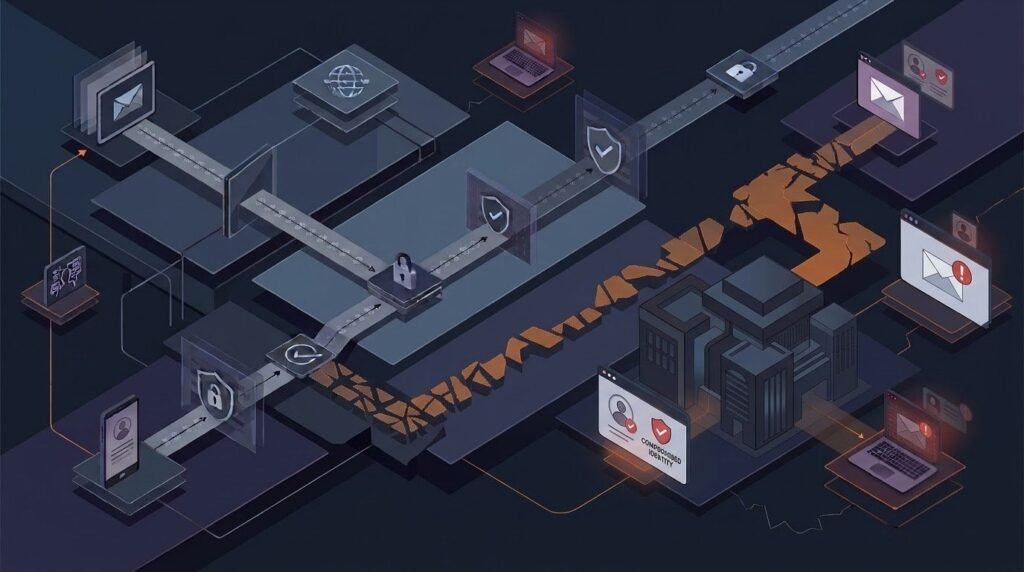
Business Email Compromise is one of the most costly forms of cybercrime today, yet it rarely looks like an “attack” at all. There’s no malware, no ransom note, and no obvious red flag. Instead, it relies on trust, urgency, and a well-timed email. In this guide, you’ll learn how BEC actually works, the hidden tactics most teams miss, and the controls that stop it before money moves.
What Is Business Email Compromise (BEC) and Why It’s Different From Phishing
Business Email Compromise is a targeted scam where criminals impersonate a trusted person, such as a CEO, vendor, or finance manager, to trick someone into sending money or sensitive data. Unlike generic phishing, BEC rarely uses malicious links or infected attachments. Instead, it exploits everyday business relationships.
Generic phishing casts a wide net, hoping someone clicks a bad link. BEC is precise. Attackers study a company’s vendors, executives, and payment cycles before sending a single, carefully worded message. Because there’s no malware to detect, traditional antivirus tools often miss it entirely.
For example, imagine an accounts payable clerk receives an email that appears to come from a long-standing vendor. The message says the vendor’s bank account has changed and asks for future payments to be redirected. The email looks legitimate, the tone matches past correspondence, and the invoice amount is normal. As a result, the payment goes through, and the money lands in a criminal’s account instead.
Business Email Compromise Hidden Threats Most Teams Miss
Most security training focuses on obvious phishing red flags. However, BEC hides in plain sight, using tactics that blend into normal business communication.
Business Email Compromise via Vendor Invoice Hijacking
Attackers monitor vendor relationships, sometimes for weeks, before sending a fraudulent invoice or bank-change request. Because the request mirrors real invoices in format and timing, it often slips past busy finance staff.
Business Email Compromise and Payroll Redirect Scams
In this variation, criminals impersonate an employee and ask HR or payroll to update direct deposit details. The change is small, quiet, and easy to approve without a second look, which is exactly why it works.
Executive Impersonation and Urgency Traps
A message that appears to come from a CEO or CFO, marked “urgent” and “confidential,” pressures employees to act fast. This urgency is intentional. It discourages the pause needed to verify the request through a separate channel.
“Reply-Chain” Attacks (Thread Hijacking)
Some attackers gain access to a real email account and reply within an existing conversation thread. Because the thread has genuine history, the fraudulent request appears to come from someone already trusted in that exchange.
Lookalike Domains and Display-Name Deception
A domain like “cybknow-inc.com” instead of “cybknow.com” can pass a quick glance. Similarly, display names can be spoofed so the message looks like it’s from a real colleague, even though the underlying email address is fake.
MFA Fatigue and Session or Token Theft
In more advanced cases, attackers exploit login fatigue by repeatedly triggering multi-factor authentication prompts until someone approves one by mistake. Also, stolen session tokens can let an attacker bypass MFA entirely once obtained. This is a growing concern as AI-driven scams become more sophisticated, automating parts of the reconnaissance and message-crafting process.
The Real Cost of Business Email Compromise (Beyond the Wire Transfer)
The direct financial loss from Business Email Compromise is only part of the damage. Legal exposure, operational disruption, and reputational harm often follow close behind.
Quick checklist of hidden costs:
- Legal and compliance exposure from failing to protect customer or partner data
- Operational downtime while teams investigate and freeze affected accounts
- Vendor relationship strain after a redirected payment dispute
- Reputational damage if clients learn their data or funds were mishandled
- Insurance and audit costs tied to incident response and reporting requirements
- Employee trust erosion, especially if an internal account was compromised
Because these costs compound quickly, even a single successful BEC attempt can affect a business for months.
How Attackers Pull Off Business Email Compromise Step-by-Step
Understanding the attack sequence makes it easier to spot and interrupt. Here’s a simplified, non-alarmist breakdown:
- Reconnaissance – Attackers research the company’s leadership, vendors, and communication style using public sources like LinkedIn and press releases.
- Trust building – They register a lookalike domain or compromise a real mailbox, then study existing email threads.
- Timing the request – The fraudulent ask, whether it’s a bank change or urgent transfer, is timed around real deadlines like payroll or invoice cycles.
- Payment reroute – Funds are directed to an account controlled by the attacker, often a “mule” account that quickly moves the money.
- Cleanup – The attacker may delete sent messages or set up mailbox rules to hide replies, delaying detection.
Because each step is deliberately low-key, the entire process can unfold without triggering typical security alerts. This pattern reflects broader shifts covered in current cybersecurity trends, where attackers increasingly favor social engineering over technical exploits.
Early Warning Signs of Business Email Compromise (Finance + Ops Checklist)
Finance and operations teams are the last line of defense. Watch for these red flags:
- A sudden change in bank account or payment details
- Unusual urgency, secrecy, or pressure to bypass normal approval steps
- A reply-to address that doesn’t match the sender’s actual domain
- Slight misspellings or extra characters in a vendor or executive’s email address
- Requests to avoid phone confirmation (“email only, please”)
- New or unfamiliar approval paths for payments
- Odd timing, such as requests sent late at night or right before a holiday
- Language or tone that feels slightly “off” compared to previous messages
If two or more of these appear together, it’s worth pausing the transaction to verify.
How to Prevent Business Email Compromise (Controls That Actually Work)
Effective defense against Business Email Compromise combines people, technology, and financial controls. No single layer is enough on its own.
People and process:
- Require a documented payment verification standard operating procedure (SOP) for any bank detail change
- Use call-back verification with a known phone number, never one provided in the suspicious email
- Train staff to slow down when urgency or secrecy is emphasized
Email and security controls:
- Implement DMARC, SPF, and DKIM at a high level to reduce domain spoofing
- Apply conditional access policies that flag logins from unusual locations or devices
- Set up alerts for suspicious mailbox rules, such as auto-forwarding to external addresses
Finance controls:
- Require dual approval for any payment above a set threshold
- Add a formal vendor change control process, separate from day-to-day email
- Periodically audit vendor banking details against original onboarding records
These layered protections matter even more for smaller organizations, which are often seen as easier targets. If you’re building a security program from scratch, this guide on cybersecurity for startups offers a useful starting point.
Incident Response: What To Do If You Suspect Business Email Compromise
If you suspect a Business Email Compromise attempt or successful fraud, act quickly and methodically:
- Freeze the payment immediately by contacting your bank’s fraud department.
- Contact your bank to request a wire recall, even if it seems unlikely to succeed.
- Preserve evidence, including the original email headers, without deleting anything.
- Reset credentials for any account suspected of compromise.
- Review mailbox rules for unauthorized forwarding or deletion rules.
- Notify stakeholders, including leadership, legal, and affected vendors or employees.
For official reporting steps, the FBI’s Business Email Compromise resource outlines how to file a report, and CISA’s phishing guidance provides broader context on related social engineering tactics. Victims can also file a report through the FTC’s identity theft resource hub if personal data was involved.
Frequently Asked Questions
What is Business Email Compromise in simple terms?
It’s a scam where criminals impersonate someone you trust, such as an executive or vendor, to trick you into sending money or data.
How is BEC different from phishing?
Phishing often uses malicious links or attachments sent broadly. BEC is targeted, relies on impersonation, and usually contains no malware at all.
Can antivirus software stop Business Email Compromise?
Not reliably. Because BEC emails don’t contain malware, they can bypass traditional antivirus and spam filters.
What’s the first thing to do if we suspect BEC?
Freeze the payment and contact your bank immediately, then preserve the email evidence for investigation.
Are small businesses really targeted by BEC?
Yes. Smaller companies are often targeted because they may have fewer verification controls in place.
Does multi-factor authentication fully prevent BEC?
It helps, but advanced attackers can exploit MFA fatigue or steal session tokens, so it should be paired with process controls.
How often should vendor banking details be reviewed?
At minimum, annually, and any time a change request is received via email.
Conclusion
Business Email Compromise thrives on trust, urgency, and small gaps in verification, not sophisticated malware. The good news is that it’s highly preventable with the right combination of payment verification steps, email security controls, and finance oversight. Start by reviewing your current approval process today. If you want a broader look at where these threats are heading, explore Cybknow ongoing coverage of emerging attack trends and build your defenses before an incident forces the issue.