
Knowing how to prevent devastating supply chain attacks in 2026 is no longer optional. Indeed, it has become a baseline survival skill for any team that ships software. In 2024 and 2025, attackers moved away from direct breaches. Instead, they started poisoning the tools, libraries, and vendors their targets already trusted.
Today, AI accelerates code generation. Meanwhile, CI/CD pipelines ship at speeds that were unthinkable five years ago. As a result, open-source dependency counts now climb into the thousands for a typical app. The attack surface has grown to match.
This guide gives CISOs, DevSecOps engineers, and CTOs a clear, action-oriented playbook. You will find concrete controls, a prioritized checklist, and honest guidance on where to begin even if your team is stretched thin. Every recommendation here is grounded in current frameworks such as SLSA, NIST SSDF, and CISA guidance.
What Counts as a Supply Chain Attack in 2026?
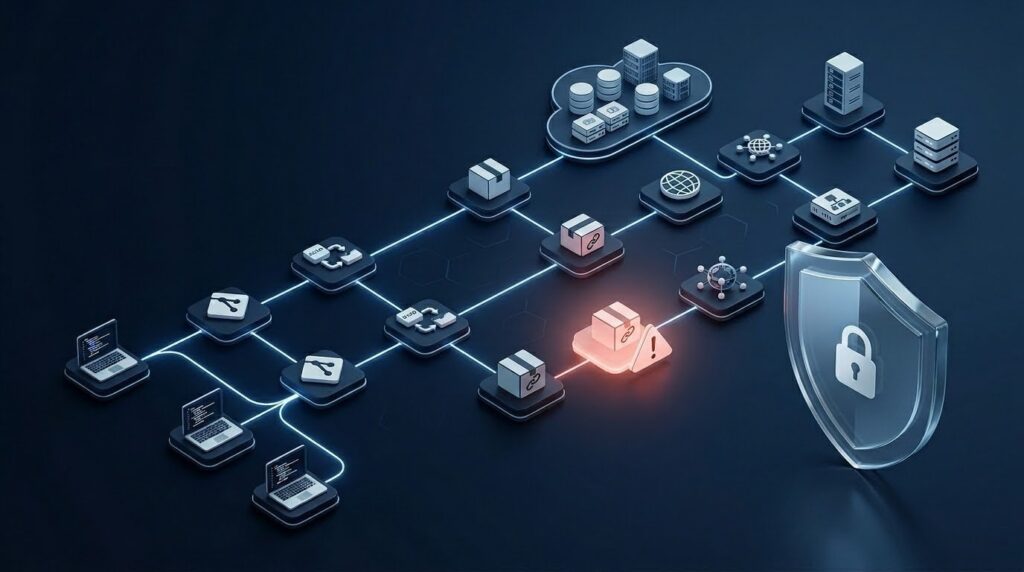
A supply chain attack happens when an adversary compromises something your organization depends on. Rather than attacking you directly, they corrupt a trusted input. That input can take many forms:
- Open-source packages attackers upload malicious versions of popular libraries through typosquatting or dependency confusion
- Build systems and CI/CD pipelines injecting malicious steps into your automated build process
- Third-party SaaS tools compromising a vendor that already has broad access to your environment
- Container base images replacing a legitimate Docker image with a backdoored one in a public registry
- Code repositories stealing signing keys or hijacking maintainer accounts to push malicious commits
Two Attack Types Worth Knowing
Dependency confusion is one of the most effective techniques. An attacker publishes a package to a public registry using the same name as your internal private package but at a higher version number. Package managers then pull the public (malicious) version instead of yours. It is a simple trick, but it works.
Typosquatting, by contrast, exploits spelling mistakes. For example, reqeusts instead of requests. Developers install the wrong package by accident, and the attacker gets in quietly.
In 2026, AI-generated code adds yet another layer of risk. Developers now accept large code blocks from AI assistants without reviewing every import. As a result, attackers have started planting packages that AI tools recommend. For a broader view of where these threats fit the wider risk landscape, see the OWASP Top 10 vulnerabilities in 2026.
Why Supply Chain Attacks Got Worse (2024–2026 Drivers)
Several forces converged to make software supply chain security much harder over the last two years. Understanding them helps you prioritize your defenses.
Speed Has Become a Liability
Faster release cycles leave less time for review. Teams shipping multiple times per day are, therefore, more likely to merge an unreviewed dependency update. They may also accept a Dependabot PR without checking what actually changed. Velocity is a business advantage but it is also an attacker’s best friend.
AI Development Introduces Hidden Risk
Developers now rely on AI pair programmers that suggest packages by name. However, some of those package names simply do not exist yet. Attackers register them first, then wait for someone to install them. The Shadow AI threats problem extends well beyond chatbots it reaches into the invisible dependencies that AI-generated code quietly adds to your codebase.
Open-Source Sprawl Is Out of Control
A typical Node.js or Python project can carry thousands of transitive dependencies. Most teams cannot name even a fraction of them. Consequently, they cannot assess their security posture either. This is not a people problem it is a scale problem that requires automated tooling to solve properly.
Vendors Now Hold the Keys
SaaS tools today hold read and write access to source code, production infrastructure, and customer data often all at once. Compromise one vendor and you effectively compromise everything they touch. Furthermore, most organizations have far more integrations than they realize, which makes this risk especially hard to manage without a formal inventory.
Threat Actors Have Leveled Up
Nation-state groups and well-resourced criminal organizations have studied incidents like the XZ Utils backdoor in detail. Techniques such as long-term maintainer social engineering, slow-burn contribution campaigns, and multi-stage payload delivery are now documented attack patterns not theoretical scenarios. To understand how today’s threats evolved from earlier attack trends, the cybersecurity trends in 2026 breakdown is worth reading in full.
The 2026 Prevention Playbook
This playbook covers six control domains. Work through them in order of risk. However, do not let perfect be the enemy of good start with quick wins now and build toward mature controls over the coming quarters.
Source Control Security
Your repository is where everything starts. Therefore, harden it first.
Branch Protection and Signed Commits
Start with branch protection rules. Require at least one code review before merging to main. Also, disable direct pushes to production branches. Set status checks as required, so a failing security scan blocks the merge automatically.
Next, require signed commits. Developers should sign their commits with GPG or SSH keys. This creates a verifiable chain you can prove exactly who wrote what and when. Moreover, GitHub, GitLab, and Bitbucket all support enforced commit signing through repository policies, so there is no real barrier to adoption.
MFA, FIDO2, and Least Privilege
Stolen credentials are, by far, the most common way attackers gain repository access. Enforcing hardware security keys (FIDO2) eliminates phishing-based account takeover entirely. Therefore, require MFA across your whole GitHub organization no exceptions, not even for service accounts.
Finally, apply the principle of least privilege. Most developers do not need write access to every repository. Service accounts used in CI/CD should have scoped, time-limited tokens rather than personal access tokens with broad org-level scope.
CI/CD Hardening
Your build pipeline is a privileged execution environment. Treat it accordingly.
Use Ephemeral Runners
Spin up a fresh, clean runner for every build and destroy it afterward. Persistent runners accumulate state over time cached credentials, leftover files, and potentially malware. Ephemeral runners eliminate this problem entirely. Notably, GitHub Actions supports ephemeral, just-in-time runners natively, so adoption is straightforward.
Isolate Secrets and Lock Down Identities
Never expose secrets as environment variables across all jobs. Instead, scope each secret to the specific job and step that needs it. Use dedicated secret management tools HashiCorp Vault or AWS Secrets Manager, for example rather than repository-level secrets for anything sensitive.
Additionally, CI/CD jobs should authenticate to cloud providers using short-lived OIDC tokens, not long-lived static keys. Pin the actions and third-party plugins you use to a specific commit SHA, not a mutable tag like @v3. Tags can be moved by anyone with repo access; commit SHAs, however, cannot be changed.
Audit Your Workflow Files
Review every workflow file for steps that pull from an external URL or run a shell script without a checksum. Also watch for steps that accept untrusted user input. Attackers frequently inject malicious steps through forked pull requests that trigger privileged workflows. As a result, many teams get compromised through their own automation not a direct breach.
Dependency Security and SBOM
Dependencies represent the largest attack surface in modern software. Therefore, you must manage them systematically.
Generate an SBOM at Every Build
An SBOM Software Bill of Materials is a machine-readable inventory of every component in your software. Think of it like an ingredient list for your application. Generate one at build time using tools like Syft or CycloneDX. Store it alongside your artifact so you can quickly check your exposure whenever a new CVE drops.
Run SCA on Every Pull Request
Run an SCA tool on every pull request. Tools such as Dependabot, Snyk, or OWASP Dependency-Check flag known vulnerabilities before they reach production. However, flagging alone is not enough set a policy that blocks merges for critical-severity findings. Detection without enforcement is just noise.
Pin Versions and Use Lockfiles
Never allow floating version ranges in production dependencies. Instead, pin to exact versions and commit your lockfiles (package-lock.json, poetry.lock, Cargo.lock). This ensures reproducible builds and prevents silent upgrades from pulling in malicious patches. Furthermore, OWASP’s supply chain guidance recommends verifying package provenance check that each package has a verified publisher and a legitimate, active maintainer before you trust it.
Set Up a Private Package Registry
Host an internal registry Artifactory, Nexus, or AWS CodeArtifact work well and route all dependency fetches through it. Configure it to validate packages against public registries, screen for dependency confusion, and cache only approved versions. This single control blocks a large class of attacks at the network level, before any code ever reaches a developer’s machine.
Artifact Integrity: Signing and SLSA
Once you build an artifact, you need to prove it was not tampered with. Otherwise, your secure build pipeline can still deliver a corrupted output to production.
Sign Your Artifacts with Sigstore
Sign your build outputs container images, binaries, packages using Sigstore. Sigstore provides free, open-source signing infrastructure built around short-lived certificates. Your deployment pipeline can then verify each signature before launching anything. Unsigned or tampered artifacts get rejected automatically. This is a strong, low-cost control.
Add Build Attestations
An attestation is a signed statement about how an artifact was produced. It records the source commit, the build system, and the dependencies that were resolved during the build. Attestations let you answer a critical question: “Did this artifact actually come from our CI/CD system?” A checksum alone cannot answer that. An attestation, however, can.
Understand and Apply SLSA Levels
SLSA Supply chain Levels for Software Artifacts is a security framework. Think of it as a maturity model for your build process. Level 1 indicates that your build process is scripted and generates basic provenance. At Level 2, the build runs within a hosted service, adding more control and consistency. By contrast, Level 3 introduces a hardened build environment where provenance cannot be forged by any individual contributor.
Most organizations should aim for SLSA Level 2 this year. For your most critical services, target Level 3 next year. Together, signing, attestations, and SLSA give you a verifiable chain of custody from source commit all the way to production deployment.
Cloud and SaaS Vendor Governance
Third-party access is a major blind spot. In fact, many organizations have hundreds of SaaS integrations they cannot fully enumerate without deliberate effort.
Assess Vendors Before You Grant Access
Before granting a new vendor access to your environment, evaluate their security posture. Ask for SOC 2 Type II reports, penetration test summaries, and their incident response process. For critical vendors, require an annual re-assessment. For startups building this governance layer from scratch, the startup security plan provides a strong foundation.
Review OAuth Access on a Schedule
Audit which third-party applications have OAuth access to your GitHub organizations, cloud accounts, and SaaS platforms. Do this at least quarterly. Revoke access for any tool you no longer use. Also restrict scopes a documentation tool, for example, does not need write access to your production infrastructure.
Tier Vendors by Risk Level
Classify vendors by the access they hold and the potential damage if they are compromised. Apply stricter monitoring and shorter review cycles to high-tier vendors. Additionally, include security clauses in every vendor agreement: breach notification timelines, right-to-audit provisions, and minimum security standards. These do not prevent attacks on their own. However, they create accountability and speed up your response considerably when something does go wrong.
Monitoring and Detection
Prevention is necessary, but it is not sufficient on its own. You also need to catch what slips through.
Collect Build Telemetry
Log everything that happens in your CI/CD pipeline: which packages were resolved, which external URLs were contacted, and which environment variables were accessed. Anomalies are early warning signals. For instance, a build reaching out to an unexpected domain or resolving a package version that was not in the lockfile both warrant immediate investigation.
Watch Your Dependency Graph for Changes
Monitor your dependency graph over time. A new transitive dependency, a package that recently changed maintainers, or a version bump that introduces a post-install script are all red flags. Tools like Socket.dev scan for these behavioral signals automatically. As a result, you can catch problems before they reach production rather than after users are already affected.
Deploy Runtime Security and Integrate Alerts
Deploy runtime security tools Falco, AWS GuardDuty, or Google Cloud Security Command Center to detect unexpected behavior in production. If a container suddenly makes DNS requests to unfamiliar domains, you want an alert, not a log entry discovered days later. Furthermore, connect your monitoring to your incident response workflow. A flagged dependency should create a ticket and notify the on-call engineer automatically not sit unread in a dashboard.
For guidance on responding to related threats, such as ransomware that often follows a supply chain compromise, see ransomware defense in 2026.
Checklist: Prevent Devastating Supply Chain Attacks in 2026
Use this checklist in your next security review. It covers all six control domains.
Source Control
- Branch protection enabled on all production branches
- Signed commits required (GPG or SSH)
- FIDO2/hardware MFA enforced for all contributors
- Least-privilege repository access applied
- Service account tokens scoped and time-limited
CI/CD
- Ephemeral runners in use for all builds
- Secrets scoped to individual jobs and steps
- OIDC authentication to cloud providers (no static keys)
- Third-party actions pinned to commit SHA
- Workflow files reviewed for untrusted inputs
Dependencies
- SCA tool running on every pull request
- Blocking policy on critical/high severity CVEs
- All dependencies pinned to exact versions
- Lockfiles committed and enforced
- SBOM generated at build time and stored
- Private package registry in use
Artifact Integrity
- Container images and binaries signed with Sigstore
- Build attestations generated and verified at deployment
- SLSA Level 2 achieved for critical services
- Deployment pipeline rejects unsigned artifacts
Vendor Governance
- Full inventory of third-party SaaS integrations exists
- OAuth and API access reviewed quarterly
- Vendors classified by access tier
- Security clauses in all vendor agreements
Monitoring
- Build telemetry collected and retained
- Anomaly alerts configured for dependency changes
- Runtime security monitoring deployed
- Supply chain alerts integrated with incident response
Common Mistakes to Avoid
Even experienced security teams make the same predictable errors. Here are the most common ones and exactly how to fix them.
Pinning Major Versions Instead of Exact Ones
Using ^1.4.0 or ~1.4.0 still allows patch updates that can introduce malicious code. Instead, pin to 1.4.2 exactly and update deliberately. Never rely on automatic patch resolution in production.
Trusting Mutable Tags in CI/CD Actions
Tags like @v3 are mutable. A maintainer or an attacker who has compromised a maintainer account can point that tag at a different commit at any time. Therefore, always reference the full commit SHA instead. For example: uses: actions/checkout@11bd71901bbe5b1630ceea73d27597364c9af683. This is not optional for security-sensitive pipelines.
Giving Pipeline Tokens Too Much Scope
Many GitHub Actions setups grant the GITHUB_TOKEN write access to the entire organization by default. However, most workflows only need access to one repository. As a result, a compromised workflow can affect everything not just the intended repo. Limit token permissions explicitly in every workflow file.
Scanning Only Direct Dependencies
Attackers often compromise transitive dependencies the packages that your packages depend on. Therefore, ensure your SCA tool traverses the full dependency tree, not just the top-level manifest. Most modern SCA tools support this, but it must be configured deliberately.
Ignoring Post-Install Scripts
The postinstall hook in npm packages can execute arbitrary code during npm install. This is a well-known and actively exploited attack vector. Consider using --ignore-scripts in CI environments. Also, audit any package that includes a post-install script before approving it. For a systematic way to test for these weaknesses, the VAPT audit guide covers vulnerability assessment strategies in detail.
Leaving Vendor Access Active After Offboarding
When you stop using a SaaS tool, its OAuth tokens often remain active for months sometimes years. Consequently, a compromised vendor can still reach your environment long after you ended the relationship. Include vendor access revocation in your offboarding checklist and automate it wherever possible.
Quick Wins vs. Long-Term Investments
Not everything can be done this week. Here is a clear way to prioritize your effort and budget.
Do This Week (Quick Wins)
These actions require little or no budget. Moreover, each delivers immediate impact.
- Enable branch protection on your main production branches this takes roughly 10 minutes per repository.
- Enforce MFA across your GitHub or GitLab organization. Do it today, not next sprint.
- Pin your CI/CD actions to commit SHAs. A tool like Ratchet automates the conversion in minutes.
- Run
npm auditorpip-auditon your three most critical services and triage the critical findings first. - Audit OAuth access go to your GitHub org settings and revoke any third-party access you no longer need.
Invest This Quarter
These controls require more planning. However, each one delivers significant, lasting risk reduction.
- Implement a private package registry and route all dependency fetches through it.
- Deploy an SCA tool with blocking policies integrated into your pull request workflow.
- Migrate CI/CD cloud authentication to OIDC.
- Generate SBOMs at build time and store them alongside your artifacts automatically.
Long-Term Program
These require sustained investment and cross-team coordination. Nevertheless, they are essential for a truly mature security posture.
- Achieve SLSA Level 2 for your highest-criticality services.
- Implement artifact signing and deploy-time verification across all production workloads.
- Build a formal third-party risk management program with annual vendor re-assessments.
- Develop build telemetry pipelines with anomaly detection built in from the start.
A strong security culture across your engineering organization underpins all of these efforts. The employee security gap in 2026 is often the silent enabler of supply chain risk developer awareness matters as much as the tooling does. For additional frameworks and guides, the Cybersecurity resources library is an excellent starting point.
FAQ
Q: What is a software supply chain attack?
A software supply chain attack targets the tools, dependencies, or vendors an organization trusts rather than attacking the organization directly. The goal is to corrupt software before it reaches the target. This makes detection much harder and remediation far more complex.
Q: How does an SBOM help prevent supply chain attacks?
An SBOM gives you a full inventory of every component in your software. When a new vulnerability is disclosed, you can immediately check whether you are affected. Without one, you might spend days manually searching your codebase to find out.
Q: What is SLSA and do I need it?
SLSA defines levels of build integrity, from basic scripted builds at Level 1 to fully hardened, unforgeable provenance at Level 4. If you ship software to customers or run critical infrastructure, aim for SLSA Level 2 this year. Level 3 is the right next goal for your most critical services.
Q: What is dependency confusion and how do I prevent it?
Dependency confusion occurs when an attacker publishes a malicious package to a public registry using the same name as your internal private package but at a higher version number. Package managers pull the public version by default. Prevent it by using a private registry with namespace scoping and by restricting package managers from fetching internal packages from public sources.
Q: Is CI/CD security different from application security?
Yes, though both matter equally. Application security focuses on vulnerabilities in your code itself. CI/CD security, however, focuses on the integrity of your build and deployment process. A secure application can still deliver malicious code to production if the pipeline is compromised.
Conclusion
The threat is real, the attack surface keeps growing, and the window to act is now. Learning how to prevent devastating supply chain attacks in 2026 means adopting a layered approach: lock down source control, harden CI/CD pipelines, govern your dependencies, sign your artifacts, manage third-party risk, and monitor everything.
Fortunately, none of this requires a greenfield security program. Most organizations can make meaningful progress this week with branch protection, MFA enforcement, and a quick OAuth access audit. Build on those wins. Then add SCA tooling, OIDC authentication, and SBOM generation. Over the next two quarters, work toward SLSA Level 2 for your most critical services.
The teams that avoid the next major supply chain incident will be the ones that treated prevention as an engineering discipline not a compliance checkbox. Start with quick wins this week.