

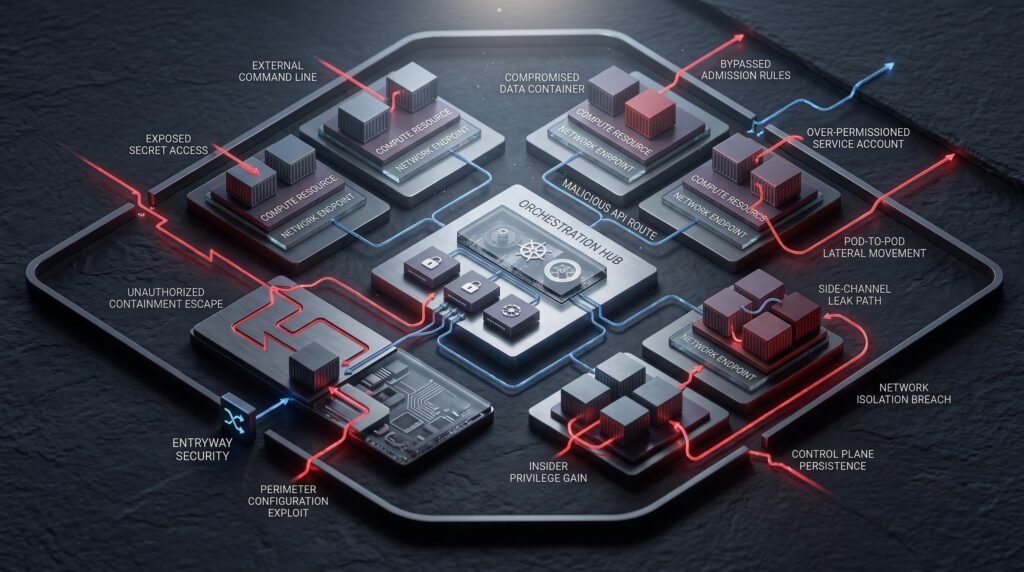
Kubernetes is an open-source platform that automates how containerized applications are deployed, scaled, and managed. Organizations use it because it lets them run many services across many machines without managing each container by hand. That flexibility also explains why Kubernetes Security deserves dedicated attention.
A cluster is not one system. Instead, it is a stack of layers: the control plane, worker nodes, container runtimes, networking, workloads, and the pipelines that feed them. Each layer has its own settings, so each one can fail in its own way. Misconfigurations, exposed components, excessive privileges, vulnerable workloads, and weak monitoring are the usual causes of trouble.
However, Kubernetes itself is not inherently insecure. Its defaults favor flexibility, so teams must make deliberate choices to harden it. In this guide, you will learn 15 threats that often go unnoticed, why each one matters, and how to reduce the risk. If you also run workloads on public cloud platforms, our overview of cloud security threats covers the wider picture.
Kubernetes Security vs. Container, Cloud, and Application Security
These terms overlap, but they are not the same. Separating them helps you assign ownership.
- Kubernetes security protects the cluster, including the API server, RBAC, admission control, network policies, and cluster configuration.
- Container security protects images, runtimes, and the processes inside containers.
- Cloud security covers the provider account, identity, and managed services around the cluster.
- Application security covers the code and APIs that run inside your pods.
- Infrastructure security covers the nodes, operating systems, and underlying network.
A gap in one area can undo strong controls in another. Consequently, the threats below span all of these layers.
Kubernetes Security Threats at a Glance
| Kubernetes Threat | Main Risk | Key Defense | |
|---|---|---|---|
| 1 | Overly permissive RBAC | Privilege escalation | Least-privilege roles |
| 2 | Exposed API server | Unauthorized cluster control | Restrict network access, enforce authentication |
| 3 | Insecure dashboard access | Administrative takeover | Remove or tightly limit web UIs |
| 4 | Secrets exposure | Credential theft | Encryption at rest, narrow access, rotation |
| 5 | Vulnerable container images | Known flaws in workloads | Scan, minimize, and update images |
| 6 | Container escape risks | Host compromise | Patch runtimes, reduce privileges |
| 7 | Privileged containers | Host-level access | Enforce Pod Security Standards |
| 8 | Insecure network policies | Lateral movement | Default-deny policies |
| 9 | Weak pod security configuration | Larger attack surface | Non-root, dropped capabilities |
| 10 | Insecure ingress and services | Unintended exposure | TLS, authentication, restricted exposure |
| 11 | Supply chain attacks | Tampered software | Provenance, signing, verification |
| 12 | Weak namespace isolation | Cross-team access | RBAC, policies, quotas together |
| 13 | Insecure admission control | Unsafe workloads deployed | Policy enforcement at admission |
| 14 | Poor logging and monitoring | Undetected incidents | Audit logs, alerting, response plans |
| 15 | Misconfigured cluster components | Weak foundations | Hardening, updates, regular reviews |
1. Overly Permissive RBAC Permissions
What It Means
Kubernetes RBAC controls who can do what inside a cluster. A Role grants permissions within one namespace, while a ClusterRole grants permissions cluster-wide or on cluster-scoped resources. A RoleBinding or ClusterRoleBinding then attaches those permissions to users, groups, or service accounts.
Problems begin when permissions are broader than the job requires. Wildcards, cluster-admin grants, and shared service accounts are common examples.
Why It Matters
RBAC is additive, so Kubernetes has no deny rules to offset a generous grant. In addition, some permissions are especially sensitive. Creating pods, reading Secrets, or using the escalate, bind, and impersonate verbs can each turn a limited identity into a powerful one. The official RBAC documentation explains how these rules interact.
Example
A developer needs to view logs in one namespace. However, the team binds a ClusterRole with broad read access to every namespace, including Secrets. Later, the developer’s account is phished, and the attacker inherits far more access than the developer ever needed.
How to Prevent It
- Grant the smallest set of verbs and resources that each identity needs.
- Prefer namespaced Roles over ClusterRoles when the job allows it.
- Avoid wildcards, and limit
cluster-adminto a very small group. - Create a dedicated service account for each workload instead of sharing one.
- Review bindings on a schedule, and remove stale ones because old access tends to linger.
2. Exposed Kubernetes API Server
What It Means
The API server is the front door to the cluster. Every kubectl command, controller, and CI/CD job talks to it. Exposure means the API endpoint is reachable from networks that should never see it.
Why It Matters
Kubernetes API security depends on two questions: who are you, and what may you do? Network reachability is only the first barrier. If authentication is weak or authorization is loose, reachability becomes a real risk. Furthermore, an endpoint that faces the open internet receives constant unwanted traffic, even when it is well protected.
Example
A team creates a test cluster with a public endpoint. The cluster later hosts production data, but no one revisits the endpoint settings. Because nothing breaks, the exposure stays unnoticed.
How to Prevent It
- Restrict API access to private networks, VPNs, or approved IP ranges, since managed services offer private endpoints and authorized ranges.
- Use strong authentication, such as OIDC-based single sign-on, instead of long-lived static tokens.
- Disable anonymous access unless you have a specific need.
- Enforce authorization with RBAC so that authenticated users still get limited rights.
- Also enable audit logging to record API activity.
3. Insecure Kubernetes Dashboard Access
What It Means
Web dashboards give administrators a visual way to manage clusters. They are convenient, but they act as a powerful client of the API server. Therefore, whatever the dashboard can do, anyone who reaches it may also be able to do.
Why It Matters
A dashboard with weak authentication or a highly privileged service account can hand out administrative control. Maintenance matters too. The original Kubernetes Dashboard project was archived on January 21, 2026, and no longer receives maintenance. As a result, the Kubernetes project published a transition guide for teams that still rely on a web UI.
Example
An engineer installs a dashboard for a demo and grants it broad permissions so everything works. When the demo ends, the dashboard stays online with those permissions.
How to Prevent It
- Remove dashboards you do not actively use.
- Never expose an administrative UI directly to the internet.
- Require real user authentication instead of a shared admin token.
- Give each user only the permissions they already have through RBAC.
- Replace unmaintained tools with actively supported alternatives.
4. Kubernetes Secrets Exposure
What It Means
Kubernetes Secrets store sensitive values such as passwords, tokens, and keys. By default, they are stored in etcd as base64-encoded data. Base64 is an encoding format, not encryption.
Why It Matters
Kubernetes secrets security depends on access control and storage protection. Anyone who can read a Secret through the API can see its value. Similarly, anyone who can create a pod in a namespace can often mount that namespace’s Secrets. Values also leak through logs, environment dumps, and configuration files committed to source control.
The Secrets documentation is clear on this point. Kubernetes Secrets are not automatically a full secrets-management system.
Example
A team stores a database password in a Secret. Later, a debugging script prints environment variables into a shared log. As a result, the password sits in a log platform that many people can search.
How to Prevent It
- Restrict
get,list, andwatchaccess to Secrets with RBAC. - Enable encryption at rest for etcd, ideally with a KMS provider.
- Keep credentials out of images, logs, and repositories.
- Consider an external secrets manager if the credential is high-value.
- Rotate secrets regularly, and rotate them immediately after any suspected exposure.
5. Vulnerable Container Images
What It Means
A container image bundles an application with its operating system packages and libraries. If those components are outdated, the image carries known vulnerabilities into your cluster.
Why It Matters
Kubernetes schedules whatever image you point it at, but it does not judge whether the contents are safe. Therefore, vulnerability scanning belongs in a secure software supply chain, not on an optional wish list. In addition, old base images and unused packages add risk without adding value.
Example
A team builds an image once and deploys it for two years. Meanwhile, a widely used library receives a security fix, but nobody rebuilds the image.
How to Prevent It
- Scan images in CI and again in the registry, because new vulnerabilities appear over time.
- Use minimal base images so the image contains fewer packages.
- Pull from trusted registries, and reference images by digest instead of relying only on tags.
- Rebuild and redeploy on a regular schedule.
- Set clear rules for which findings block a release.
6. Container Escape Risks
What It Means
Containers share the host’s kernel. A container escape happens when a process breaks out of its isolation and reaches the underlying node.
Why It Matters
Once an attacker controls a node, they may reach other pods on it, the credentials those pods hold, and node-level components. Escapes usually depend on a vulnerable runtime, a kernel flaw, or a permissive configuration, such as extra privileges or host mounts. Strong isolation reduces the chance of each.
Example
A public-facing service runs with broad privileges and a sensitive host directory mounted. A flaw in the application gives an attacker code execution. Because of the loose configuration, a contained problem becomes a node-level one.
How to Prevent It
- Keep container runtimes, kernels, and node images patched.
- Drop unneeded Linux capabilities, and avoid host mounts.
- Apply the default seccomp profile to workloads.
- Use user namespaces where your environment supports them.
- Run untrusted or multi-tenant workloads on sandboxed runtimes or dedicated nodes, since a shared kernel is the main weak point.
7. Privileged Containers
What It Means
A privileged container runs with almost all of the host’s capabilities and can access host devices. Consequently, it removes most of the isolation that containers normally provide.
Why It Matters
The Pod Security Standards describe privileged pods as disabling most security mechanisms. For that reason, the Baseline profile disallows them. Privileged mode also makes host interaction easy, which is exactly what an attacker wants.
Example
A developer enables privileged mode to fix a networking issue during testing. Later, the setting slips into the production manifest. Now a routine web workload runs with host-level power.
How to Prevent It
- Disallow privileged containers by default through Pod Security Admission.
- Grant specific capabilities instead of full privilege when a workload needs something special.
- Isolate any genuinely privileged system agents in their own namespace with tight RBAC.
- Check manifests for
privileged: trueduring code review, because small changes are easy to miss.
8. Insecure Network Policies
What It Means
A Kubernetes NetworkPolicy defines which pods may talk to which other pods, namespaces, or IP ranges. Without policies, most clusters allow all pod-to-pod traffic. However, the network plugin must also support enforcement, or the policies do nothing.
Why It Matters
Open communication makes lateral movement easy. If one pod is compromised, an attacker can probe every other service. Therefore, Kubernetes network security starts with restricting traffic to what each workload truly needs. The NetworkPolicy documentation covers the details.
Example
A public web front end is compromised through an application bug. Because no policies exist, it can reach the internal database directly, even though only the API service should ever connect there.
How to Prevent It
Start with a default-deny policy in each namespace, and then allow only the required flows:
apiVersion: networking.k8s.io/v1
kind: NetworkPolicy
metadata:
  name: default-deny-all
  namespace: payments
spec:
  podSelector: {}
  policyTypes:
    - Ingress
    - Egress
- Add explicit allow rules for each legitimate connection.
- Remember to allow DNS egress, or name resolution will fail.
- Confirm that your CNI plugin enforces NetworkPolicy before you rely on it.
- Test policies in a staging cluster before rollout.
9. Weak Pod Security Configuration
What It Means
Pod security covers the settings that shape how a container runs: user, capabilities, filesystem, and host access. Weak defaults leave the door open. Common examples include running as root, adding extra capabilities, allowing privilege escalation, and sharing host namespaces.
Why It Matters
Each loose setting widens the attack surface. For example, a container running as root with writable storage and extra capabilities gives an attacker many more options after a compromise. In contrast, a locked-down pod limits what a successful exploit can do.
Example
A team ships an image that runs as root because it was easier during development. Later, a vulnerable dependency lets an attacker run commands. Since the process has root access, every follow-up step gets easier.
How to Prevent It
Use a hardened security context as a starting point:
securityContext:
  runAsNonRoot: true
  allowPrivilegeEscalation: false
  readOnlyRootFilesystem: true
  capabilities:
    drop: ["ALL"]
  seccompProfile:
    type: RuntimeDefault
- Apply the Restricted Pod Security Standard where workloads allow it.
- Never share host namespaces (
hostNetwork,hostPID,hostIPC) unless you have a strong reason. - Treat a read-only root filesystem as a good practice that goes beyond the standard.
- Build images that work as non-root users from the start, so you avoid painful fixes later.
10. Insecure Ingress and Service Exposure
What It Means
Ingress controllers, gateways, load balancers, and NodePort services connect your workloads to the outside world. Each one is a potential entry point.
Why It Matters
Internal services can become public by accident. For instance, a single LoadBalancer type or a permissive ingress rule may expose an admin panel, a metrics endpoint, or a database. Unnecessary open ports and missing TLS add to the problem.
Example
A developer exposes an internal reporting tool through a load balancer for quick testing. Because the tool has no login page, anyone who finds it can open it. Worse, the service stays reachable long after the test ends.
How to Prevent It
- Default services to
ClusterIP, and expose only what must be public. - Terminate TLS at the ingress, and keep certificates current.
- Add authentication in front of internal tools.
- Restrict source ranges for administrative endpoints.
- Audit exposed services and load balancers regularly because they change over time.
11. Kubernetes Supply Chain Attacks
What It Means
A supply chain attack targets the things you trust rather than the cluster directly. Examples include base images, dependencies, Helm charts, CI/CD pipelines, and third-party components.
Why It Matters
Compromised upstream software runs with the permissions you give it. The NSA and CISA hardening guidance treats supply chain risk as a major source of compromise. It also recommends scanning images and following least privilege. For a deeper look at pipeline defenses, read our guide to software supply chain attacks.
Example
A team pulls a popular Helm chart without reviewing it. When a later update changes an image reference to an untrusted source, the change deploys automatically.
How to Prevent It
- Use trusted registries, and pin images by digest.
- Review third-party charts and manifests before you adopt them.
- Generate software bills of materials (SBOMs), and track provenance.
- Sign images, and then verify signatures at admission time.
- Protect CI/CD credentials with short-lived, narrowly scoped access.
12. Weak Namespace Isolation
What It Means
Namespaces group resources and give teams separate spaces to work in. They are an organizational tool, so they do not create a complete security boundary on their own.
Why It Matters
Without extra controls, workloads in different namespaces can still communicate, share nodes, and compete for resources. In addition, a permissive ClusterRole can cross namespace lines entirely. Teams that assume namespaces equal isolation often discover the gap too late.
Example
Two teams share a cluster and rely on separate namespaces for safety. However, neither adds network policies. As a result, a compromised pod in one namespace can reach services in the other.
How to Prevent It
- Combine namespaces with RBAC scoped to each namespace.
- Apply default-deny NetworkPolicies in every namespace.
- Set ResourceQuotas and LimitRanges to prevent resource exhaustion.
- Label namespaces with Pod Security Admission levels.
- Use dedicated nodes or separate clusters if workloads have different trust levels.
13. Insecure Admission Control
What It Means
Admission controllers review requests to the API server before objects are stored. They can validate or modify configurations. Therefore, this is where you stop insecure workloads before they run.
Why It Matters
Without admission policy, every team must remember every rule, and people forget. As a result, insecure manifests slip through. Built-in Pod Security Admission enforces the Pod Security Standards through namespace labels. Kubernetes also offers ValidatingAdmissionPolicy, and many teams add policy engines for custom rules.
Example
An organization writes a rule that pods must not run as root, but it only documents the rule in a wiki. When a new hire deploys a root container, nothing stops it.
How to Prevent It
- Enable Pod Security Admission with
enforce,audit, andwarnmodes. - Write policies for image sources, resource limits, and required labels.
- Choose failure behavior carefully for webhook-based policies, because a fail-open setup can quietly bypass rules.
- Test new policies in audit mode first so you do not block legitimate deployments.
- Keep policies in version control, and review changes like any other code.
14. Poor Kubernetes Logging and Monitoring
What It Means
Visibility means capturing what happens in the cluster: API requests, authentication events, workload behavior, and node activity. Kubernetes audit logs record who did what through the API server. In self-managed clusters, however, audit logging may need explicit configuration, and managed providers expose it in different ways.
Why It Matters
Prevention alone is not enough, because some attacks will get through. Without logs, you cannot tell what happened, how far it spread, or whether it is over. Alerting on unusual activity also shortens the time between compromise and response. Finally, a documented incident response plan turns those alerts into action.
Example
A service account starts listing Secrets across many namespaces at odd hours. Because audit logs are off and no alerts exist, nobody notices.
How to Prevent It
- Enable audit logging with a policy that captures sensitive actions.
- Forward logs to a central system outside the cluster, so an attacker cannot easily erase them.
- Alert on
execinto pods, Secret access, RBAC changes, and failed logins. - Monitor runtime behavior for unexpected processes and network connections.
- Practice your response steps with tabletop exercises before a real incident.
15. Misconfigured Cluster Components
What It Means
Beyond workloads, the cluster’s own components need secure settings. These include the kubelet on each node, etcd, the API server flags, and supporting services.
Why It Matters
A single weak component can undermine everything above it. For example, an exposed kubelet API, unauthenticated component endpoints, or an etcd store reachable from workloads can bypass higher-level controls. Outdated versions also add known flaws. The Kubernetes security checklist lists many of these settings.
Example
A cluster is built quickly with default node settings. Months later, an audit finds that the kubelet accepts unauthenticated requests on the internal network.
How to Prevent It
- Disable anonymous kubelet access, and use webhook authorization.
- Protect etcd with mutual TLS and network restrictions.
- Remove unnecessary services, add-ons, and open ports.
- Stay on a supported Kubernetes version, and patch promptly. Check the official release page for the current support window.
- Compare your configuration against the NSA and CISA hardening guidance and a recognized benchmark such as CIS.
Kubernetes Security Checklist
Use this list as a starting point for regular reviews.
- Use least-privilege RBAC, and review bindings regularly.
- Restrict Kubernetes API access to trusted networks and identities.
- Protect Kubernetes Secrets with encryption at rest, narrow access, and rotation.
- Scan container images in CI and in your registry.
- Avoid privileged containers, and never share host namespaces without a reason.
- Apply Pod Security Standards through Pod Security Admission.
- Use default-deny NetworkPolicies in every namespace.
- Secure Ingress and exposed services with TLS and authentication.
- Monitor Kubernetes audit logs, and alert on suspicious activity.
- Keep Kubernetes components, runtimes, and nodes updated.
- Secure CI/CD pipelines, and verify image provenance.
- Review cluster configuration against a benchmark on a schedule.
Conclusion
Kubernetes Security works best as a set of layers. Strong identity and access control limit what each user and workload can do. Meanwhile, workload hardening, network segmentation, and careful secrets management contain the damage when something fails.
Supply chain controls and secure configuration reduce the chance of failure in the first place. Monitoring then closes the loop by showing you what prevention missed. Finally, continuous security testing confirms that your controls work in practice. Independent cloud and container security testing can also reveal gaps that internal reviews overlook.
Start with the checklist above, fix the highest-risk items first, and then repeat the review often.
Frequently Asked Questions
What is Kubernetes Security?
Kubernetes Security is the practice of protecting clusters, workloads, and the data they handle. It covers identity and access control, pod and container configuration, network segmentation, secrets management, supply chain integrity, and monitoring. It also works alongside container, cloud, and application security, because a weakness in any layer can affect the others.
Why is Kubernetes Security important?
Kubernetes controls where workloads run, who can reach them, and what credentials they hold. Therefore, a single misconfiguration can expose many services at once. Strong Kubernetes Security limits the blast radius of mistakes and compromises, supports compliance work, and gives teams the visibility to respond quickly.
What are the most common Kubernetes security threats?
Common threats include excessive RBAC permissions, exposed API servers or dashboards, poorly protected Secrets, vulnerable images, privileged pods, missing network policies, and weak monitoring. Most come from configuration choices rather than flaws in Kubernetes itself. As a result, regular reviews and automated policy checks prevent many of them.
How can I secure a Kubernetes cluster?
Start with least-privilege RBAC and a restricted API endpoint. Next, enforce Pod Security Standards, apply default-deny NetworkPolicies, scan and sign images, and encrypt Secrets at rest. Finally, enable audit logging, keep components updated, and review your configuration against the Kubernetes security checklist or a recognized benchmark.
What is Kubernetes RBAC?
Role-based access control decides which users and service accounts can perform which actions on which resources. Roles and ClusterRoles define permissions, while RoleBindings and ClusterRoleBindings grant them to subjects. Because RBAC is additive and has no deny rules, administrators should grant only what each identity needs.
How can Kubernetes Secrets be protected?
Limit who can read Secrets with RBAC, and enable encryption at rest for etcd. In addition, keep Secrets out of images, logs, and source control. If a credential is sensitive, consider an external secrets manager, and rotate values regularly. Remember that base64 encoding is not encryption.
How does NetworkPolicy improve Kubernetes security?
By default, pods can usually talk to each other freely. A NetworkPolicy restricts which pods, namespaces, and IP ranges can connect. When you combine it with a default-deny rule, it limits lateral movement after a compromise. However, your network plugin must enforce NetworkPolicy, or the policies have no effect.